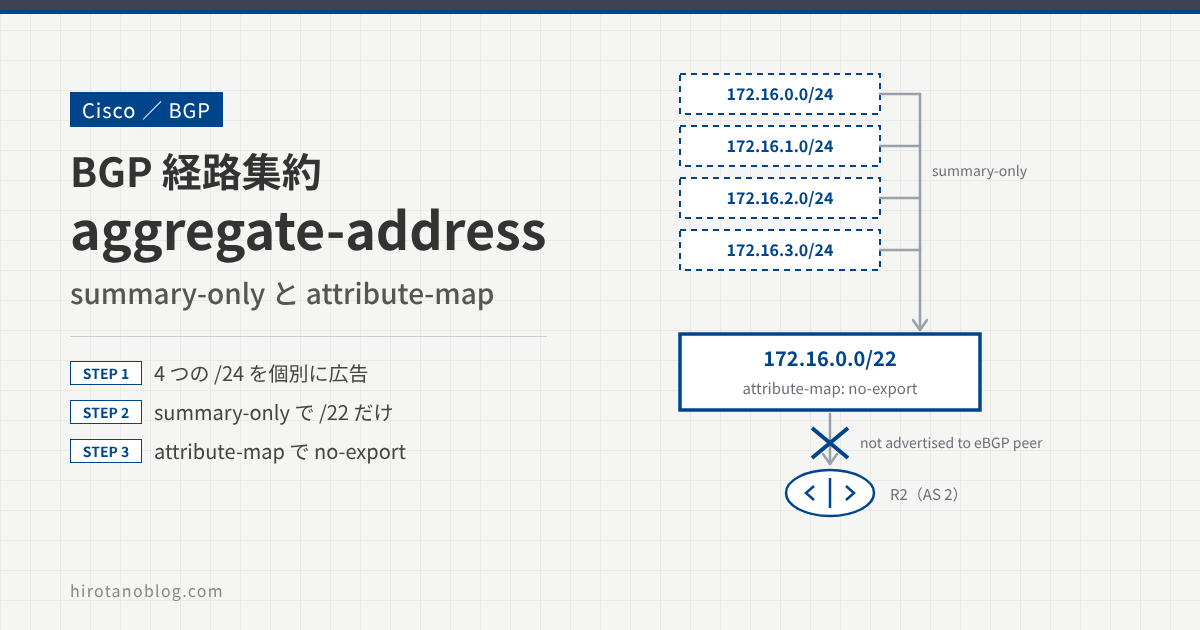
BGP では、複数の経路を 1 つにまとめて(集約して)広告できます。コマンドは aggregate-address です。この記事では、R1 の 4 つの経路を集約して R2 に広告し、さらに attribute-map で集約経路に属性(no-export コミュニティ)を付けたときの動きを確認します。
aggregate-address で集約経路を作って広告するには、集約の範囲に入る個別経路が、少なくとも 1 つ BGP テーブルにある必要があります。
- 集約する前の個別経路を広告する
aggregate-address ... summary-onlyで、集約経路だけを広告するattribute-mapで、集約経路に no-export コミュニティを付ける
検証構成
R1 に 4 つのループバックを作り、network コマンドで BGP に載せます。この経路を aggregate-address で集約して、R2 に広告します。
集約する前の個別経路を広告する
まず、集約する前の基本設定をします。
R1
R1(config)# interface Loopback100
R1(config-if)#  ip address 172.16.0.1 255.255.255.0
R1(config-if)# interface Loopback101
R1(config-if)#  ip address 172.16.1.1 255.255.255.0
R1(config-if)# interface Loopback102
R1(config-if)#  ip address 172.16.2.1 255.255.255.0
R1(config-if)# interface Loopback103
R1(config-if)#  ip address 172.16.3.1 255.255.255.0

R1(config)# router bgp 1
R1(config-router)#  network 172.16.0.0 mask 255.255.255.0
R1(config-router)#  network 172.16.1.0 mask 255.255.255.0
R1(config-router)#  network 172.16.2.0 mask 255.255.255.0
R1(config-router)#  network 172.16.3.0 mask 255.255.255.0
R1(config-router)#  neighbor 192.168.12.2 remote-as 2
R2
R2(config)# router bgp 2
R2(config-router)#  neighbor 192.168.12.1 remote-as 1
R2 の BGP テーブルを確認すると、R1 の 4 つのループバックの経路を受け取っています。
R2
R2# show ip bgp
BGP table version is 5, local router ID is 2.2.2.2
Status codes: s suppressed, d damped, h history, * valid, > best, i - internal,
              r RIB-failure, S Stale, m multipath, b backup-path, f RT-Filter,
              x best-external, a additional-path, c RIB-compressed,
Origin codes: i - IGP, e - EGP, ? - incomplete
RPKI validation codes: V valid, I invalid, N Not found

     Network          Next Hop            Metric LocPrf Weight Path
 *>  172.16.0.0/24    192.168.12.1             0             0 1 i
 *>  172.16.1.0/24    192.168.12.1             0             0 1 i
 *>  172.16.2.0/24    192.168.12.1             0             0 1 i
 *>  172.16.3.0/24    192.168.12.1             0             0 1 I
172.16.0.0/24、172.16.1.0/24、172.16.2.0/24、172.16.3.0/24 をまとめた経路は、172.16.0.0/22 です。3 オクテット目の 0〜3 は、2 進数で下位 2 ビットだけが違うので、プレフィックス長を 24 から 2 減らした /22 でまとめられます。
集約経路だけを広告する(summary-only)
R1 で集約経路だけを広告するには、aggregate-address に summary-only を付けます。
R1
R1(config)# router bgp 1
R1(config-router)# aggregate-address 172.16.0.0 255.255.252.0 summary-only
R1 の BGP テーブルを確認すると、集約経路 172.16.0.0/22 ができ、個別経路には s(suppressed:広告を止めている)が付いています。
R1
R1# show ip bgp
BGP table version is 10, local router ID is 172.16.3.1
Status codes: s suppressed, d damped, h history, * valid, > best, i - internal,
              r RIB-failure, S Stale, m multipath, b backup-path, f RT-Filter,
              x best-external, a additional-path, c RIB-compressed,
Origin codes: i - IGP, e - EGP, ? - incomplete
RPKI validation codes: V valid, I invalid, N Not found

     Network          Next Hop            Metric LocPrf Weight Path
 s>  172.16.0.0/24    0.0.0.0                  0         32768 i
 *>  172.16.0.0/22    0.0.0.0                            32768 i
 s>  172.16.1.0/24    0.0.0.0                  0         32768 i
 s>  172.16.2.0/24    0.0.0.0                  0         32768 i
 s>  172.16.3.0/24    0.0.0.0                  0         32768 I
R1 から R2 に広告している経路を確認します。
R1
R1# show ip bgp neighbors 192.168.12.2 advertised-routes
BGP table version is 10, local router ID is 172.16.3.1
Status codes: s suppressed, d damped, h history, * valid, > best, i - internal,
              r RIB-failure, S Stale, m multipath, b backup-path, f RT-Filter,
              x best-external, a additional-path, c RIB-compressed,
Origin codes: i - IGP, e - EGP, ? - incomplete
RPKI validation codes: V valid, I invalid, N Not found

     Network          Next Hop            Metric LocPrf Weight Path
 *>  172.16.0.0/22    0.0.0.0                            32768 i

Total number of prefixes 1
R1 から R2 へは、集約経路 172.16.0.0/22 だけを広告しています。R2 の BGP テーブルを確認しても、集約経路だけです。
R2
R2# show ip bgp
BGP table version is 10, local router ID is 2.2.2.2
Status codes: s suppressed, d damped, h history, * valid, > best, i - internal,
              r RIB-failure, S Stale, m multipath, b backup-path, f RT-Filter,
              x best-external, a additional-path, c RIB-compressed,
Origin codes: i - IGP, e - EGP, ? - incomplete
RPKI validation codes: V valid, I invalid, N Not found

     Network          Next Hop            Metric LocPrf Weight Path
 *>  172.16.0.0/22    192.168.12.1             0             0 1 I
集約経路に属性を付ける(attribute-map)
集約経路に属性を設定するには、attribute-map を使います。たとえば、R1 で集約経路に no-export コミュニティを付けてみます。
no-export コミュニティが付いた経路は、外部の AS(eBGP ピア)には広告されません。そのため、R1 で集約経路に no-export を付けると、R2 は集約経路を学習しないはずです。
no-export を付ける
まず、no-export コミュニティを設定するルートマップを作ります。
R1
R1(config)# route-map SET-COMMUNITY permit 10
R1(config-route-map)# set community no-export
R1(config-route-map)# exit
作ったルートマップを、aggregate-address の attribute-map で指定します。
R1
R1(config)# router bgp 1
R1(config-router)# aggregate-address 172.16.0.0 255.255.252.0 summary-only attribute-map SET-COMMUNITY
R1 の BGP テーブルを確認すると、集約経路 172.16.0.0/22 があります。
R1
R1# show ip bgp
BGP table version is 32, local router ID is 172.16.3.1
Status codes: s suppressed, d damped, h history, * valid, > best, i - internal,
              r RIB-failure, S Stale, m multipath, b backup-path, f RT-Filter,
              x best-external, a additional-path, c RIB-compressed,
Origin codes: i - IGP, e - EGP, ? - incomplete
RPKI validation codes: V valid, I invalid, N Not found

     Network          Next Hop            Metric LocPrf Weight Path
 s>  172.16.0.0/24    0.0.0.0                  0         32768 i
 *>  172.16.0.0/22    0.0.0.0                            32768 i
 s>  172.16.1.0/24    0.0.0.0                  0         32768 i
 s>  172.16.2.0/24    0.0.0.0                  0         32768 i
 s>  172.16.3.0/24    0.0.0.0                  0         32768 I
172.16.0.0/22 の詳細を確認すると、コミュニティが no-export になっています。
R1
R1# show ip bgp 172.16.0.0 255.255.252.0
BGP routing table entry for 172.16.0.0/22, version 28
Paths: (1 available, best #1, table default, not advertised to EBGP peer)
  Not advertised to any peer
  Refresh Epoch 1
  Local, (aggregated by 1 172.16.3.1)
    0.0.0.0 from 0.0.0.0 (172.16.3.1)
      Origin IGP, localpref 100, weight 32768, valid, aggregated, local, atomic-aggregate, best
      Community: no-export
| 表示 | 意味 |
|---|---|
| not advertised to EBGP peer | no-export があるので、eBGP ピアには広告しない |
| Not advertised to any peer | この経路を広告しているピアはない |
| atomic-aggregate | as-set を付けずに集約したことを示す |
| Community: no-export | attribute-map で付けたコミュニティ |
コミュニティが no-export の経路は外部の AS に広告されないので、R2 は何も経路を学習していません。
R2
R2# show ip bgp
R2#
次の記事では、attribute-map で付けたコミュニティを、ネイバーに広告します。
>> 次の記事:【BGP】経路集約(aggregate-address、attribute-map )Part2
まとめ
| 設定 | R2 が受け取る経路 |
|---|---|
| 集約なし | 172.16.0.0/24〜172.16.3.0/24 の 4 つ |
aggregate-address ... summary-only | 172.16.0.0/22 だけ |
... summary-only attribute-map(no-export) | なし(no-export で外部 AS に広告しない) |
attribute-map を使うと、集約経路にコミュニティなどの属性を付けられます。no-export のように経路の広告範囲を変える属性を付けると、ネイバーが受け取る経路も変わります。
コメント