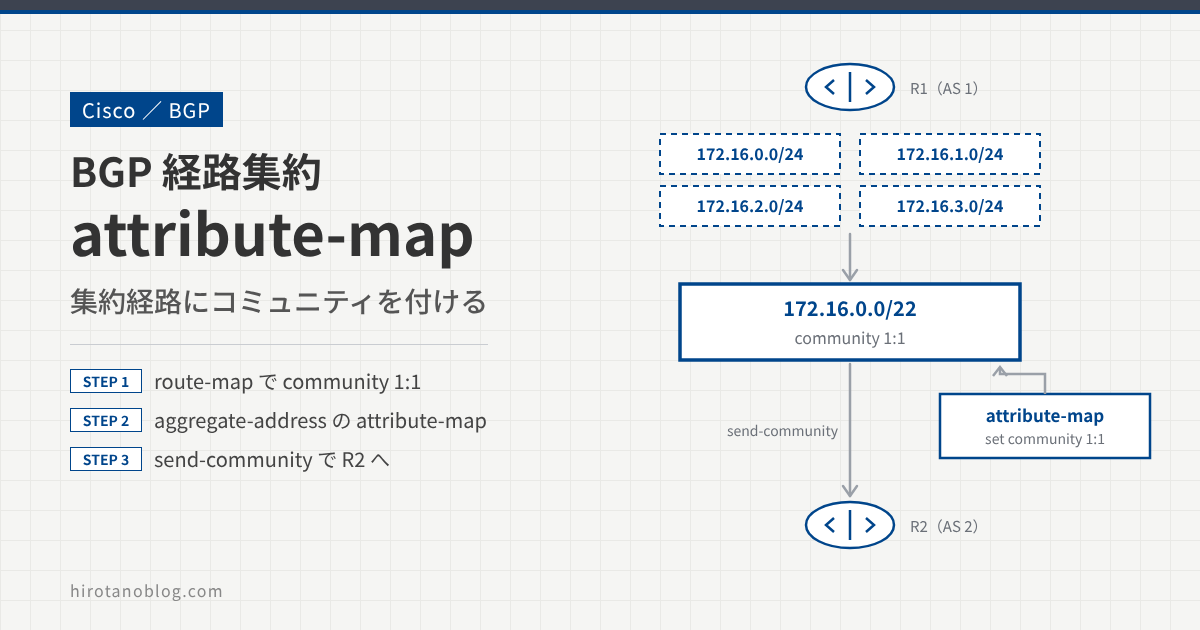
前回の記事の続きとして、ルータが作った集約経路に BGP コミュニティを付けて、ネイバーへ広告します。集約経路の属性は、aggregate-address の attribute-map オプションで設定します。
基本の設定などは、前回の記事を参照してください。
>> 参考:【BGP】経路集約(aggregate-address、attribute-map )Part1
- コミュニティを付けるルートマップを作る
attribute-mapで、集約経路にコミュニティを付ける- ネイバーで、集約経路のコミュニティを確認する
検証構成
次の構成で、R1 が作る集約経路 172.16.0.0/22 に、コミュニティ 1:1 を付けて R2 に広告します。
コミュニティを付けるルートマップを作る
まず、ip bgp-community new-format で、コミュニティの表示を「AS番号:値」(2 バイト:2 バイト)の形式にします。
R1
R1(config)# ip bgp-community new-format
次に、コミュニティを設定するルートマップを作ります。
R1
R1(config)# route-map SET-COMMUNITY-1:1 permit 10
R1(config-route-map)# set community 1:1
attribute-map で集約経路にコミュニティを付ける
集約経路にコミュニティを付けて R2 に広告するには、aggregate-address の attribute-map オプションで、作ったルートマップを指定します。
R2 にコミュニティを送るため、ネイバーの send-community も忘れずに設定します。コミュニティは、既定では相手に送られません。
R1
R1(config)# router bgp 1
R1(config-router)# aggregate-address 172.16.0.0 255.255.252.0 summary-only attribute-map SET-COMMUNITY-1:1
R1(config-router)# neighbor 192.168.12.2 send-community
R1 の BGP テーブルを確認すると、172.16.0.0/22 にコミュニティ 1:1 が付いています。
R1
R1# show ip bgp 172.16.0.0 255.255.252.0
BGP routing table entry for 172.16.0.0/22, version 38
Paths: (1 available, best #1, table default)
  Advertised to update-groups:
     4
  Refresh Epoch 1
  Local, (aggregated by 1 172.16.3.1)
    0.0.0.0 from 0.0.0.0 (172.16.3.1)
      Origin IGP, localpref 100, weight 32768, valid, aggregated, local, atomic-aggregate, best
      Community: 1:1
| 表示 | 意味 |
|---|---|
| Local, (aggregated by 1 172.16.3.1) | R1 自身が作った集約経路。AS 1 のルータ 172.16.3.1(R1 のルータ ID)が集約した |
| atomic-aggregate | as-set を付けずに集約したので、個別経路の AS_PATH の情報が失われている可能性があることを示す属性が付いている |
| Community: 1:1 | attribute-map で付けたコミュニティ |
R2 でコミュニティを確認する
R2 で、集約経路にコミュニティが付いているかを確認します。確認する前に、R2 でもコミュニティの表示形式を変えておきます。
R2
R2(config)# ip bgp-community new-format
R2 の BGP テーブルを見ると、summary-only を設定しているので、集約経路だけを学習しています。
R2
R2# show ip bgp
BGP table version is 46, local router ID is 2.2.2.2
Status codes: s suppressed, d damped, h history, * valid, > best, i - internal,
              r RIB-failure, S Stale, m multipath, b backup-path, f RT-Filter,
              x best-external, a additional-path, c RIB-compressed,
Origin codes: i - IGP, e - EGP, ? - incomplete
RPKI validation codes: V valid, I invalid, N Not found

     Network          Next Hop            Metric LocPrf Weight Path
 *>  172.16.0.0/22    192.168.12.1             0             0 1 i
R2 で集約経路の詳細を確認すると、コミュニティ 1:1 が付いています。
R2
R2# show ip bgp 172.16.0.0 255.255.252.0
BGP routing table entry for 172.16.0.0/22, version 46
Paths: (1 available, best #1, table default)
  Advertised to update-groups:
     1
  Refresh Epoch 2
  1, (aggregated by 1 172.16.3.1)
    192.168.12.1 from 192.168.12.1 (172.16.3.1)
      Origin IGP, metric 0, localpref 100, valid, external, atomic-aggregate, best
      Community: 1:1
attribute-map は、集約経路そのものの属性を設定するオプションです。個別経路のどの属性を引き継ぐかを選ぶ advertise-map とは役割が違います。advertise-map は、advertise-map の記事 で確認しています。
まとめ
| 設定 | 役割 |
|---|---|
route-map ... set community 1:1 | 付けたいコミュニティを決める |
aggregate-address ... attribute-map | 集約経路に、ルートマップで決めた属性を付ける |
neighbor ... send-community | コミュニティをネイバーに送る |
コメント