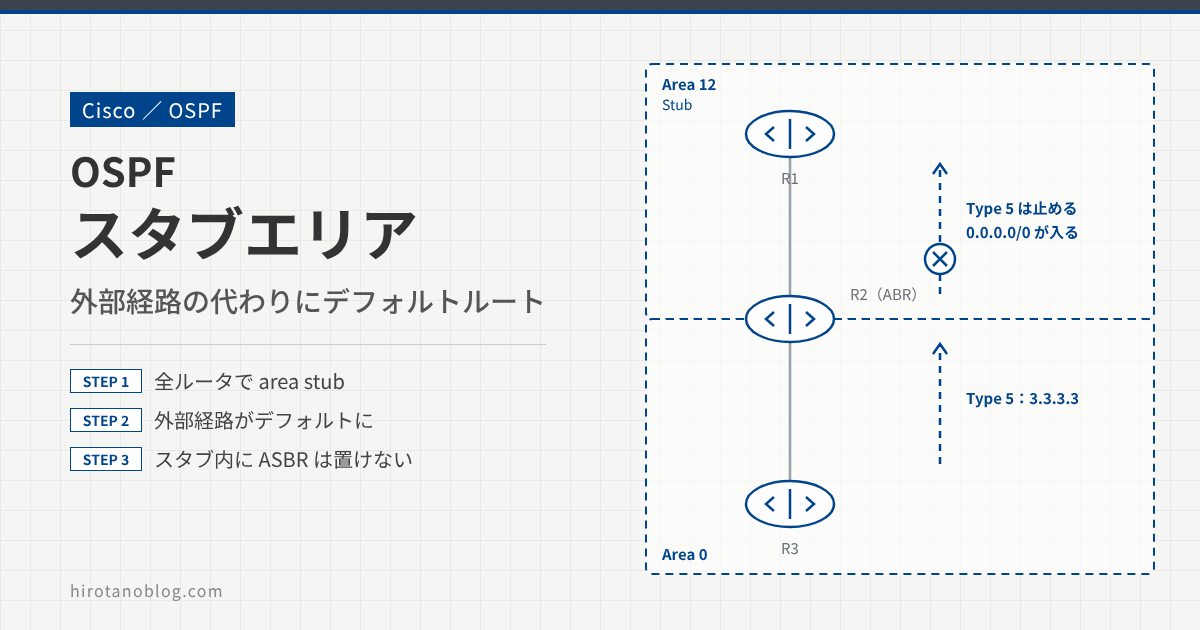
OSPF には、スタブエリアと呼ばれる特別なエリアの種類があります。スタブエリアには外部経路(LSA タイプ5)を入れず、代わりに ABR がデフォルトルートを入れます。エリア内の LSDB とルーティングテーブルが小さくなります。この記事では、スタブエリアの設定と経路の変わり方、スタブエリアに ASBR を置けないことを確かめます。
- スタブエリアの設定と、Hello の E ビット
- 外部経路がデフォルトルートに置き換わり、エリア間経路は残ること
- スタブエリアで再配信すると出るメッセージ
検証構成
R1–R2 間をエリア12、R2–R3 間をエリア0にします。R2 が ABR です。外部経路を作るため、R3 ではループバック 3.3.3.3 を直結経路として OSPF に再配信(redistribute)します。エリア12をスタブエリアにします。
OSPF の基本設定
R1
R1(config)# router ospf 1
R1(config-router)# network 192.168.12.0 0.0.0.255 area 12
R2
R2(config)# router ospf 1
R2(config-router)# network 192.168.12.0 0.0.0.255 area 12
R2(config-router)# network 2.2.2.2 0.0.0.0 area 0
R2(config-router)# network 192.168.23.0 0.0.0.255 area 0
R3
R3(config)# router ospf 1
R3(config-router)# redistribute connected subnets
R3(config-router)# network 192.168.23.0 0.0.0.255 area 0
R1 では、3.3.3.3 が外部経路(O E2)、2.2.2.2 と 192.168.23.0/24 がエリア間経路(O IA)として入っています。
R1
R1# show ip route ospf
Codes: L - local, C - connected, S - static, R - RIP, M - mobile, B - BGP
       D - EIGRP, EX - EIGRP external, O - OSPF, IA - OSPF inter area
       N1 - OSPF NSSA external type 1, N2 - OSPF NSSA external type 2
       E1 - OSPF external type 1, E2 - OSPF external type 2
       i - IS-IS, su - IS-IS summary, L1 - IS-IS level-1, L2 - IS-IS level-2
       ia - IS-IS inter area, * - candidate default, U - per-user static route
       o - ODR, P - periodic downloaded static route, H - NHRP, l - LISP
       + - replicated route, % - next hop override

Gateway of last resort is not set

      2.0.0.0/32 is subnetted, 1 subnets
O IA     2.2.2.2 [110/2] via 192.168.12.2, 00:06:30, FastEthernet0/0.12
      3.0.0.0/32 is subnetted, 1 subnets
O E2      3.3.3.3 [110/20] via 192.168.12.2, 00:05:45, FastEthernet0/0.12
O IA  192.168.23.0/24 [110/2] via 192.168.12.2, 00:06:30, FastEthernet0/0.12
エリア12をスタブエリアにする
エリア12のすべてのルータ(R1 と R2)で area 12 stub を設定します。エリアの種類は Hello で照合されるので、片側だけではネイバーになれません。
R1
R1(config)# router ospf 1
R1(config-router)# area 12 stub
R2
R2(config)# router ospf 1
R2(config-router)# area 12 stub
スタブエリアにすると、R1 と R2 がやり取りする Hello の Options で、E ビット(External Routing)が 0 になります。
この記事の画面は、実際の画面ではなく、検証時の画面から見るポイントを抜き出して描いたイメージです。バージョンによって、項目の並びや表記は変わります。
▸ Internet Protocol Version 4, Src: 192.168.12.1, Dst: 224.0.0.5▾ Open Shortest Path First ▸ OSPF Header ▾ OSPF Hello Packet Network Mask: 255.255.255.0 Hello Interval [sec]: 10 ▾ Options: 0x10, (L) LLS Data block 0... .... = DN: Not set .0.. .... = O: Not set ..0. .... = (DC) Demand Circuits: Not supported ...1 .... = (L) LLS Data block: Present .... 0... = (N) NSSA: Not supported .... .0.. = (MC) Multicast: Not capable1 .... ..0. = (E) External Routing: Not capable .... ...0 = (MT) Multi-Topology Routing: No Router Priority: 1 Router Dead Interval [sec]: 40 Designated Router: 192.168.12.2 Backup Designated Router: 192.168.12.1 Active Neighbor: 2.2.2.2 ▸ OSPF LLS Data Block
| No. | 表示 | 意味 |
|---|---|---|
| 1 | (E) External Routing: Not capable | E ビットが 0。外部経路(タイプ5)を受け付けないエリアであることを表す。N ビット(NSSA)も 0 なので、NSSA ではなく普通のスタブエリア |
確認
エリアの種類を確認する
show ip protocols では、ルータが持つエリアの数と種類(通常、スタブ、NSSA)がわかります。R1 は、スタブエリアを1つ持っています。
R1# show ip protocols
Routing Protocol is "ospf 1"
  Outgoing update filter list for all interfaces is not set
  Incoming update filter list for all interfaces is not set
  Router ID 1.1.1.1
  Number of areas in this router is 1. 0 normal 1 stub 0 nssa
  Maximum path: 4
  Routing for Networks:
    1.1.1.1 0.0.0.0 area 12
    192.168.12.0 0.0.0.255 area 12
  Routing Information Sources:
    Gateway         Distance      Last Update
    3.3.3.3              110      00:23:08
    2.2.2.2              110      00:15:41
  Distance: (default is 110)
show ip ospf では、エリア12がスタブエリアであることがわかります。
R1# show ip ospf
 Routing Process "ospf 1" with ID 1.1.1.1
 Start time: 00:01:14.340, Time elapsed: 02:53:55.352

〜 省略

    Area 12
        Number of interfaces in this area is 2 (1 loopback)
        It is a stub area
        Area has no authentication
        SPF algorithm last executed 00:12:17.136 ago
        SPF algorithm executed 11 times
        Area ranges are
        Number of LSA 6. Checksum Sum 0x02797E
        Number of opaque link LSA 0. Checksum Sum 0x000000
        Number of DCbitless LSA 0
        Number of indication LSA 0
        Number of DoNotAge LSA 0
        Flood list length 0
R1 のルーティングテーブルを確認する
外部経路(O E2 の 3.3.3.3)がなくなり、代わりに R2 から広告されたデフォルトルート(O*IA 0.0.0.0/0)が入りました。エリア間経路(O IA の 2.2.2.2 と 192.168.23.0/24)は残っています。
R1
R1# show ip route  ospf
Codes: L - local, C - connected, S - static, R - RIP, M - mobile, B - BGP
       D - EIGRP, EX - EIGRP external, O - OSPF, IA - OSPF inter area
       N1 - OSPF NSSA external type 1, N2 - OSPF NSSA external type 2
       E1 - OSPF external type 1, E2 - OSPF external type 2
       i - IS-IS, su - IS-IS summary, L1 - IS-IS level-1, L2 - IS-IS level-2
       ia - IS-IS inter area, * - candidate default, U - per-user static route
       o - ODR, P - periodic downloaded static route, H - NHRP, l - LISP
       + - replicated route, % - next hop override

Gateway of last resort is 192.168.12.2 to network 0.0.0.0

O*IA  0.0.0.0/0 [110/2] via 192.168.12.2, 00:16:58, FastEthernet0/0.12
      2.0.0.0/32 is subnetted, 1 subnets
O IA     2.2.2.2 [110/2] via 192.168.12.2, 00:16:58, FastEthernet0/0.12
O IA  192.168.23.0/24 [110/2] via 192.168.12.2, 00:16:58, FastEthernet0/0.12
デフォルトルートが O*IA になっているのは、ABR がタイプ3 LSA で広告しているためです。
スタブエリアには ASBR を置けない
スタブエリアの中には ASBR(OSPF 以外の経路を再配信するルータ)を置けません。スタブエリアは外部経路を入れないエリアなので、エリアの中で外部経路を作ることもできないためです。
スタブエリアで再配信してみる
R1 で、ループバック 1.1.1.1 を直結経路として OSPF に再配信します。
R1
R1(config)# router ospf 1
R1(config-router)# redistribute connected subnets
すると、ASBR になったのにスタブエリアしか持っていない、というメッセージが出ます。
*Jun 19 05:05:38.267: %OSPF-4-ASBR_WITHOUT_VALID_AREA: Router is currently
an ASBR while having only one area which is a stub area
R1 と R2 のネイバーは保たれますが、R1 で再配信した経路は R2 に広告されません。スタブエリアの中で外部経路を再配信したいときは、エリアを NSSA にします。
まとめ
| 項目 | スタブエリア |
|---|---|
| 設定 | エリア内の全ルータで area 12 stub |
| タイプ3(エリア間) | 入る |
| タイプ5(外部) | 入らない(代わりに ABR がデフォルトルートを広告) |
| エリア内の再配信 | できない(%OSPF-4-ASBR_WITHOUT_VALID_AREA) |
コメント