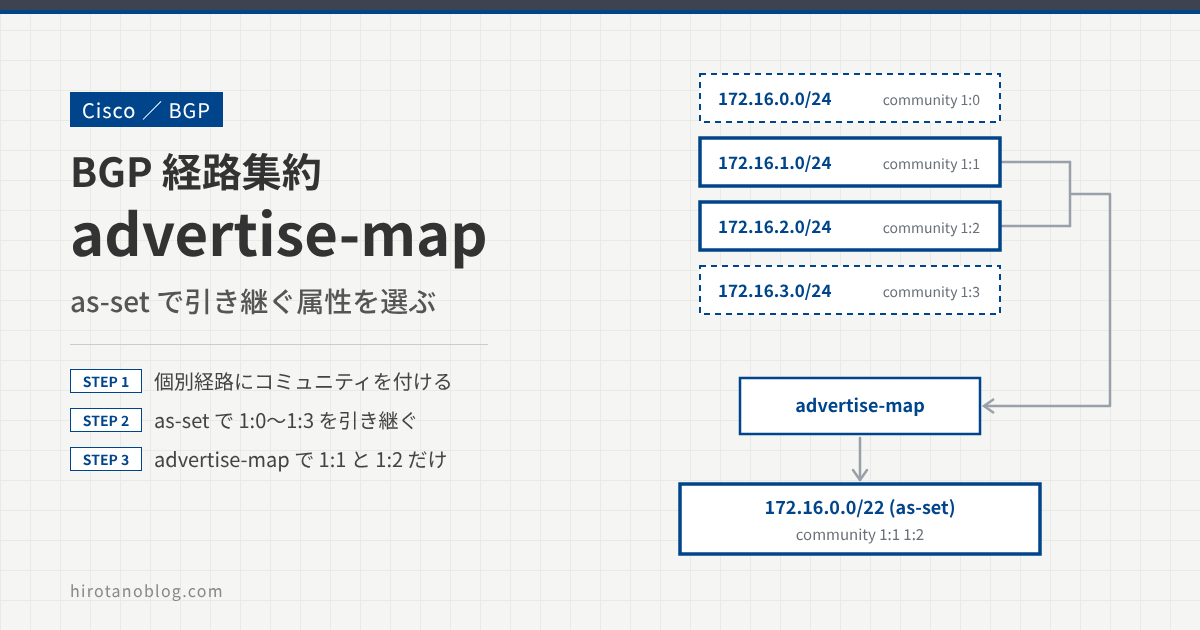
BGP の経路集約で as-set を付けると、集約経路は個別経路の属性(AS_PATH やコミュニティ)を引き継ぎます。この記事では、R1 の個別経路にそれぞれコミュニティを付け、as-set を付けた集約経路にどう引き継がれるかを確認します。そのうえで、advertise-map を使って、どの個別経路の属性を引き継ぐかを選びます。
advertise-map は、集約経路の AS_SET やコミュニティを作るときに使う個別経路を、ルートマップで選ぶオプションです。as-set と組み合わせて使います。
基本の設定は、前回の記事を参照してください。
>> 参考:【BGP】経路集約(aggregate-address、as-set)
- 個別経路にコミュニティを付けて広告する
as-setで、集約経路が個別経路のコミュニティを引き継ぐことを確認するadvertise-mapで、属性を引き継ぐ個別経路を選ぶ
検証構成
R1 の個別経路 172.16.0.0/24〜172.16.3.0/24 に、それぞれコミュニティ 1:0〜1:3 を付けて R2 に広告します。R2 では集約経路 172.16.0.0/22 を作り、R3 に広告します。
集約経路が引き継ぐ属性の確認
個別経路にコミュニティを付ける
まず、R1 で個別経路をプレフィックスリストで指定します。
R1
R1(config)# ip prefix-list L100 permit 172.16.0.0/24
R1(config)# ip prefix-list L101 permit 172.16.1.0/24
R1(config)# ip prefix-list L102 permit 172.16.2.0/24
R1(config)# ip prefix-list L103 permit 172.16.3.0/24
それぞれのプレフィックスにコミュニティを付けるルートマップを作ります。あわせて、ip bgp-community new-format で、コミュニティを「AS番号:値」の形式で表示するようにしておきます。
R1
R1(config)# ip bgp-community new-format

R1(config)# route-map SET-COMMUNITY permit 10
R1(config-route-map)#  match ip address prefix-list L100
R1(config-route-map)#  set community 1:0
R1(config-route-map)#!
R1(config-route-map)# route-map SET-COMMUNITY permit 20
R1(config-route-map)#  match ip address prefix-list L101
R1(config-route-map)#  set community 1:1
R1(config-route-map)#!
R1(config-route-map)# route-map SET-COMMUNITY permit 30
R1(config-route-map)#  match ip address prefix-list L102
R1(config-route-map)#  set community 1:2
R1(config-route-map)#!
R1(config-route-map)# route-map SET-COMMUNITY permit 40
R1(config-route-map)#  match ip address prefix-list L103
R1(config-route-map)#  set community 1:3
R1(config-route-map)#!
R1 の R2 向けのネイバーに、このルートマップを出力方向(out)で設定します。コミュニティは既定では相手に送られないので、send-community も忘れずに設定します。
R1
R1(config)# router bgp 1
R1(config-router)# neighbor 192.168.12.2 send-community
R1(config-router)# neighbor 192.168.12.2 route-map SET-COMMUNITY out
R2 の BGP テーブルで、個別経路にそれぞれコミュニティが付いていることを確認します。
R2
R2# show ip bgp 172.16.0.0
BGP routing table entry for 172.16.0.0/24, version 57
Paths: (1 available, best #1, table default)
  Advertised to update-groups:
     1
  Refresh Epoch 5
  1
    192.168.12.1 from 192.168.12.1 (172.16.3.1)
      Origin IGP, metric 0, localpref 100, valid, external, best
      Community: 1:0

R2# show ip bgp 172.16.1.0
BGP routing table entry for 172.16.1.0/24, version 54
Paths: (1 available, best #1, table default)
  Advertised to update-groups:
     1
  Refresh Epoch 5
  1
    192.168.12.1 from 192.168.12.1 (172.16.3.1)
      Origin IGP, metric 0, localpref 100, valid, external, best
      Community: 1:1


R2# show ip bgp 172.16.2.0
BGP routing table entry for 172.16.2.0/24, version 53
Paths: (1 available, best #1, table default)
  Advertised to update-groups:
     1
  Refresh Epoch 5
  1
    192.168.12.1 from 192.168.12.1 (172.16.3.1)
      Origin IGP, metric 0, localpref 100, valid, external, best
      Community: 1:2

R2# show ip bgp 172.16.3.0
BGP routing table entry for 172.16.3.0/24, version 52
Paths: (1 available, best #1, table default)
  Advertised to update-groups:
     1
  Refresh Epoch 5
  1
    192.168.12.1 from 192.168.12.1 (172.16.3.1)
      Origin IGP, metric 0, localpref 100, valid, external, best
      Community: 1:3
as-set で集約する
R2 で、学習した個別経路を集約して R3 に広告します。集約経路に個別経路のコミュニティを引き継がせるため、aggregate-address に as-set を付けます。R3 にコミュニティを送るため、send-community も設定します。今回は、summary-only で集約経路だけを広告します。
R2
R2(config)# ip bgp-community new-format

R2(config)# router bgp 2
R2(config-router)# neighbor 192.168.23.3 send-community
R2(config-router)# aggregate-address 172.16.0.0 255.255.252.0 summary-only as-set
R2 の BGP テーブルを見ると、集約経路 172.16.0.0/22 ができています。個別経路には、summary-only で広告を止めていることを示す s が付いています。
R2
R2# show ip bgp
BGP table version is 70, local router ID is 2.2.2.2
Status codes: s suppressed, d damped, h history, * valid, > best, i - internal,
              r RIB-failure, S Stale, m multipath, b backup-path, f RT-Filter,
              x best-external, a additional-path, c RIB-compressed,
Origin codes: i - IGP, e - EGP, ? - incomplete
RPKI validation codes: V valid, I invalid, N Not found

     Network          Next Hop            Metric LocPrf Weight Path
 s>  172.16.0.0/24    192.168.12.1             0             0 1 i
 *>  172.16.0.0/22    0.0.0.0                            32768 i
 s>  172.16.1.0/24    192.168.12.1             0             0 1 i
 s>  172.16.2.0/24    192.168.12.1             0             0 1 i
 s>  172.16.3.0/24    192.168.12.1             0             0 1 i
集約経路の詳細を見ると、個別経路のすべてのコミュニティ(1:0〜1:3)を引き継いでいます。
R2
R2# show ip bgp 172.16.0.0 255.255.252.0
BGP routing table entry for 172.16.0.0/22, version 71
Paths: (1 available, best #1, table default)
  Advertised to update-groups:
     1          2
  Refresh Epoch 1
  1, (aggregated by 2 2.2.2.2)
    0.0.0.0 from 0.0.0.0 (2.2.2.2)
      Origin IGP, localpref 100, weight 32768, valid, aggregated, local, best
      Community: 1:0 1:1 1:2 1:3
| 表示 | 意味 |
|---|---|
| 1, (aggregated by 2 2.2.2.2) | AS_PATH は個別経路から作った AS 1。AS 2 のルータ 2.2.2.2 が集約した経路 |
| aggregated, local | このルータが aggregate-address で作った経路 |
| Community: 1:0 1:1 1:2 1:3 | 4 つの個別経路のコミュニティをすべて引き継いでいる |
R3 の BGP テーブルを確認します。R3 でも、コミュニティの表示形式を変える設定をしておきます。
R3
R3(config)# ip bgp-community new-format

R3# show ip bgp 172.16.0.0
BGP routing table entry for 172.16.0.0/22, version 50
Paths: (1 available, best #1, table default)
  Not advertised to any peer
  Refresh Epoch 3
  2 1, (aggregated by 2 2.2.2.2)
    192.168.23.2 from 192.168.23.2 (2.2.2.2)
      Origin IGP, metric 0, localpref 100, valid, external, best
      Community: 1:0 1:1 1:2 1:3
R3 でも、集約経路にコミュニティ 1:0〜1:3 が付いていることがわかります。
引き継ぐ属性を選ぶ(advertise-map)
ここで、advertise-map で、属性を引き継ぐ個別経路を選びます。たとえば、R2 から R3 に広告する集約経路に、172.16.1.0/24 と 172.16.2.0/24 のコミュニティだけを引き継がせたいとします。
advertise-map を設定する
まず、属性を引き継ぎたい個別経路を指定します。今回はアクセスリストを使います。
R2
R2(config)# access-list 1 permit 172.16.1.0 0.0.0.255
R2(config)# access-list 1 permit 172.16.2.0 0.0.0.255
このアクセスリストを指定するルートマップを作ります。
R2
R2(config)# route-map ATTRIBUTE permit 10
R2(config-route-map)#  match ip address 1
R2(config-route-map) #exit
aggregate-address の advertise-map オプションで、このルートマップを指定します。
R2
R2(config)# router bgp 2
R2(config-router)# aggregate-address 172.16.0.0 255.255.252.0 as-set summary-only advertise-map ATTRIBUTE
R3 の BGP テーブルで集約経路を確認すると、コミュニティは 1:1 と 1:2 だけを引き継いでいます。
R3
R3# show ip bgp 172.16.0.0 255.255.252.0
BGP routing table entry for 172.16.0.0/22, version 15
Paths: (1 available, best #1, table default)
  Not advertised to any peer
  Refresh Epoch 2
  2 1, (aggregated by 2 2.2.2.2)
    192.168.23.2 from 192.168.23.2 (2.2.2.2)
      Origin IGP, metric 0, localpref 100, valid, external, atomic-aggregate, best
      Community: 1:1 1:2
advertise-map で選ばなかった個別経路(172.16.0.0/24、172.16.3.0/24)も、集約経路 172.16.0.0/22 の範囲には含まれたままです。変わるのは、集約経路の AS_SET やコミュニティを作るときに、その経路の属性を使うかどうかです。
この出力には atomic-aggregate も表示されています。ATOMIC_AGGREGATE は、集約によって AS_PATH の情報が一部失われている可能性があることを示す属性です。
まとめ
| 設定 | 集約経路のコミュニティ(R3) |
|---|---|
| aggregate-address … summary-only as-set | 1:0 1:1 1:2 1:3(すべての個別経路から引き継ぐ) |
| … as-set summary-only advertise-map ATTRIBUTE | 1:1 1:2(ACL 1 で選んだ個別経路だけから引き継ぐ) |
as-set を付けた集約経路は、個別経路のコミュニティなどの属性を引き継ぎます。advertise-map を使うと、どの個別経路の属性を引き継ぐかを選べます。コミュニティを送るときは、ネイバーごとに send-community の設定が必要です。
コメント