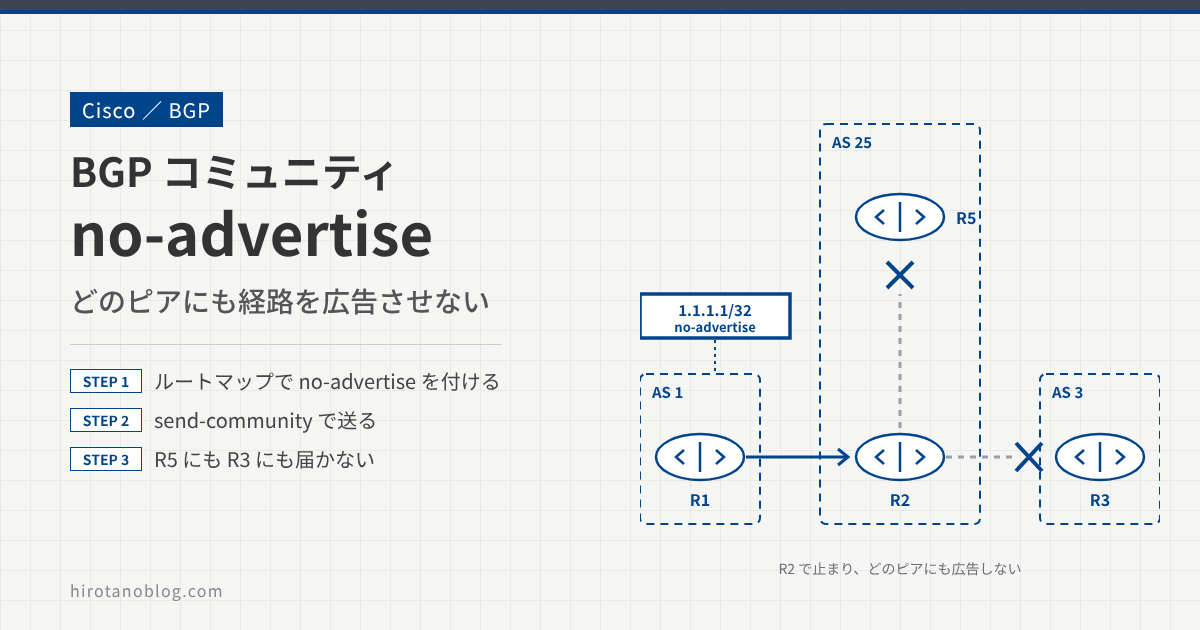
BGP の no-advertise コミュニティは、経路をほかのどのピアにも広告させないために使います。no-advertise が付いた経路を受け取ったルータは、その経路を自分では使いますが、iBGP のピアにも eBGP のピアにも広告しません。
この記事では、Cisco ルータで no-advertise コミュニティを設定し、経路がどのルータまで届くかを確認します。
- no-advertise を付ける前に、経路がすべてのルータに届くことを確認する
- ルートマップで経路に no-advertise コミュニティを付け、
send-communityで送る - no-advertise が付いた経路は、受け取った R2 で止まり、R5 にも R3 にも広告されない
検証構成
R1(AS 1)が、自分のループバック 1.1.1.1/32 を eBGP で R2(AS 25)に広告します。R2 は、同じ AS 25 の R5 と iBGP、AS 3 の R3 と eBGP でつながっています。
R1 で 1.1.1.1/32 に no-advertise を付けたとき、経路がどのルータまで届くかを確認します。
BGP の基本設定をする
まず、各ルータで AS 番号とネイバーを設定します。R1 は、network コマンドで 1.1.1.1/32 を BGP に載せます。
R1
R1(config)# router bgp 1
R1(config-router)# network 1.1.1.1 mask 255.255.255.255
R1(config-router)# neighbor 192.168.12.2 remote-as 25
R2
R2(config)# router bgp 25
R2(config-router)# neighbor 192.168.12.1 remote-as 1
R2(config-router)# neighbor 192.168.25.5 remote-as 25
R2(config-router)# neighbor 192.168.23.3 remote-as 3
R3
R3(config)# router bgp 3
R3(config-router)# neighbor 192.168.23.2 remote-as 25
R5
R5(config) #router bgp 25
R5(config-router)# neighbor 192.168.25.2 remote-as 25
no-advertise を付ける前の広告を確認する
R1 の 1.1.1.1/32 が、各ルータまで広告されていることを確認します。
R2
R2# show ip bgp
BGP table version is 4, local router ID is 2.2.2.2
Status codes: s suppressed, d damped, h history, * valid, > best, i - internal,
              r RIB-failure, S Stale, m multipath, b backup-path, f RT-Filter,
              x best-external, a additional-path, c RIB-compressed,
Origin codes: i - IGP, e - EGP, ? - incomplete
RPKI validation codes: V valid, I invalid, N Not found

     Network          Next Hop            Metric LocPrf Weight Path
 *>  1.1.1.1/32       192.168.12.1             0             0 1 I
R3
R3# show ip bgp
BGP table version is 2, local router ID is 3.3.3.3
Status codes: s suppressed, d damped, h history, * valid, > best, i - internal,
              r RIB-failure, S Stale, m multipath, b backup-path, f RT-Filter,
              x best-external, a additional-path, c RIB-compressed,
Origin codes: i - IGP, e - EGP, ? - incomplete
RPKI validation codes: V valid, I invalid, N Not found

     Network          Next Hop            Metric LocPrf Weight Path
 *>  1.1.1.1/32       192.168.23.2                           0 25 1 i
R5
R5# show ip bgp
BGP table version is 2, local router ID is 5.5.5.5
Status codes: s suppressed, d damped, h history, * valid, > best, i - internal,
              r RIB-failure, S Stale, m multipath, b backup-path, f RT-Filter,
              x best-external, a additional-path, c RIB-compressed,
Origin codes: i - IGP, e - EGP, ? - incomplete
RPKI validation codes: V valid, I invalid, N Not found

     Network          Next Hop            Metric LocPrf Weight Path
 * i 1.1.1.1/32       192.168.12.1             0    100      0 1 i
R2、R3、R5 のすべてが 1.1.1.1/32 を受け取っています。
R5 の経路には >(ベストパス)が付いていません。iBGP では、ネクストホップが書き換わらずに 192.168.12.1(R1)のまま届きます。R5 がこのネクストホップへの経路を持っていないと、ベストパスに選ばれません。
no-advertise コミュニティを付ける
R1 で、広告する 1.1.1.1/32 に no-advertise コミュニティを付けます。まず、対象のプレフィックスをプレフィックスリストで指定します。
R1
R1(config)# ip prefix-list LOOPBACK0 permit 1.1.1.1/32
ルートマップで、プレフィックスリストに一致した経路に、set community で no-advertise を付けます。
R1
R1(config)# route-map NO-ADVERTISE permit 10
R1(config-route-map)# match ip address prefix-list LOOPBACK0
R1(config-route-map)# set community no-advertise
R1(config-route-map)# route-map NO-ADVERTISE permit 1000
ルートマップの最後には、どのエントリにも一致しない経路を拒否する「暗黙の deny」があります。シーケンス 1000 の permit を足しておくと、1.1.1.1/32 以外の経路も、そのまま広告されます。
このルートマップを、ネイバー R2 への送信(out)に適用します。コミュニティを相手に送るには、send-community も必要です。
R1
R1(config)# router bgp 1
R1(config-router)# neighbor 192.168.12.2 route-map NO-ADVERTISE out
R1(config-router)# neighbor 192.168.12.2 send-community
R1 で BGP のセッションをリセットして、設定を反映させます。
R1
R1# clear ip bgp *
R1#
%BGP-5-ADJCHANGE: neighbor 192.168.12.2 Down User reset
%BGP_SESSION-5-ADJCHANGE: neighbor 192.168.12.2 IPv4 Unicast topology base removed
 from session  User reset
%BGP-5-ADJCHANGE: neighbor 192.168.12.2 Up
clear ip bgp * は、すべての BGP セッションを切ってつなぎ直します。運用中のルータでは、セッションを切らない clear ip bgp * soft out などを使います。
>> 参考:clear ip bgp の記事
no-advertise を付けた後の広告を確認する
各ルータの BGP テーブルを確認します。R2 は、これまでどおり 1.1.1.1/32 を受け取っています。
R2
R2#show ip bgp
BGP table version is 4, local router ID is 2.2.2.2
Status codes: s suppressed, d damped, h history, * valid, > best, i - internal,
              r RIB-failure, S Stale, m multipath, b backup-path, f RT-Filter,
              x best-external, a additional-path, c RIB-compressed,
Origin codes: i - IGP, e - EGP, ? - incomplete
RPKI validation codes: V valid, I invalid, N Not found

     Network          Next Hop            Metric LocPrf Weight Path
 *>  1.1.1.1/32       192.168.12.1             0             0 1 i
R3 と R5 の BGP テーブルは空になり、1.1.1.1/32 を受け取っていません。
R3
R3#show ip bgp
R3#
R5
R5#show ip bgp
R5#
no-advertise が付いた経路を受け取った R2 は、その経路を自分の BGP テーブルには入れますが、どのピアにも広告しません。同じ AS 25 の R5(iBGP)にも広告しない点が、no-export との違いです。
まとめ
| ルータ | コミュニティなし | no-export | no-advertise |
|---|---|---|---|
| R2(AS 25、R1 から eBGP) | 受け取る | 受け取る | 受け取る |
| R5(AS 25、R2 から iBGP) | 受け取る | 受け取る | 受け取らない |
| R3(AS 3、R2 から eBGP) | 受け取る | 受け取らない | 受け取らない |
no-advertise コミュニティを使うと、経路を受け取ったルータだけで使わせ、その先には一切広げないようにできます。AS の中には広告してよい場合は、no-export を使います。
コメント